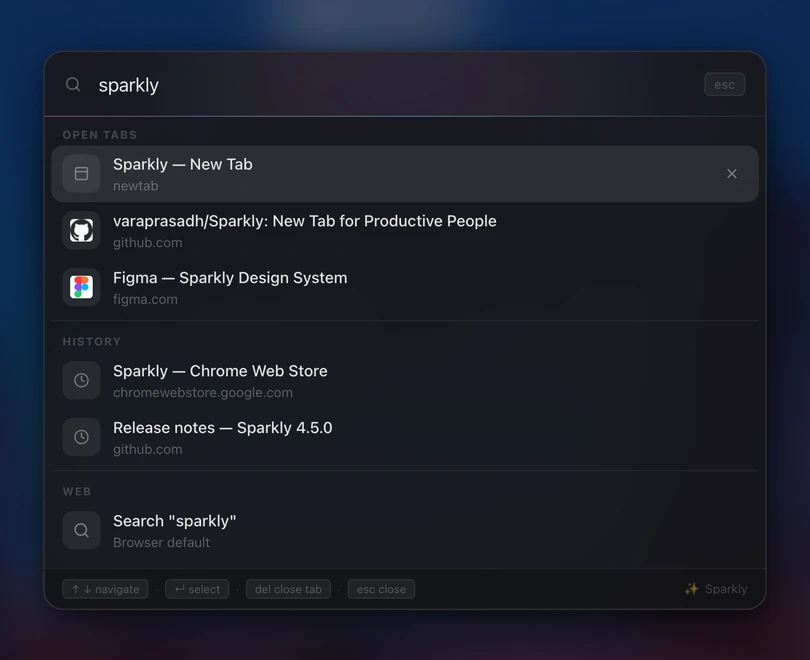
Search everything, from any page.
Sparkly Search is a system-wide overlay that pops open on any website. Your tabs, history, Google Workspace and the web, unified under one input. Fuzzy-matched, keyboard-first, styled like it came with Chrome.
It's not just for your new tab.
Most extensions give you a dashboard only on the new tab page. Sparkly Search injects into every site you visit — GitHub, Notion, your banking portal — and waits for the keystroke.
- Shadow DOM isolation — styles never leak into or from the host page.
- High-z overlay — sits above modals, sticky headers, banner ads.
- Escape to dismiss — never traps focus or breaks the back button.
- Disable per-tab — one setting toggles the whole feature off.
Tabs, history, Workspace, web.
Every keystroke fires four searches in parallel. Results land in grouped sections ordered by intent — open tabs first (cheapest to switch), then Workspace when you're signed in, then recent history, then the web as a fallback.
- Open tabs — jumps to the existing tab, never creates a duplicate.
- 7 days of history — debounced lookup against Chrome's history API.
- Workspace — Calendar, Drive, Gmail when signed in. One-click Join for meetings.
- Web suggestions — Google's suggest API, always the last option.
Keyboard-first, by design
Everything done with hands on keys. No mouse required — ever.
Questions
Does it work on pages I'm already logged into?
Yes — the overlay is injected into every tab via a content script, so it appears on logged-in sites (Gmail, GitHub, internal dashboards) without you having to grant per-site access.
What data does it send anywhere?
Your query goes to Google's public suggest API for web suggestions (same as the Chrome omnibox). Tab, history, and Workspace searches happen entirely locally in your browser. Nothing is collected, logged, or transmitted to Sparkly.
Can I change the keyboard shortcut?
Yes — visit chrome://extensions/shortcuts and rebind "Open global search" to any combination. Sparkly's Settings also links directly to that page.
Can I turn the overlay off on specific sites?
Not per-site today, but you can disable global search entirely from Settings → General. The new-tab search bar remains unaffected.