Chrome Extension

Your New Tab,
Supercharged.

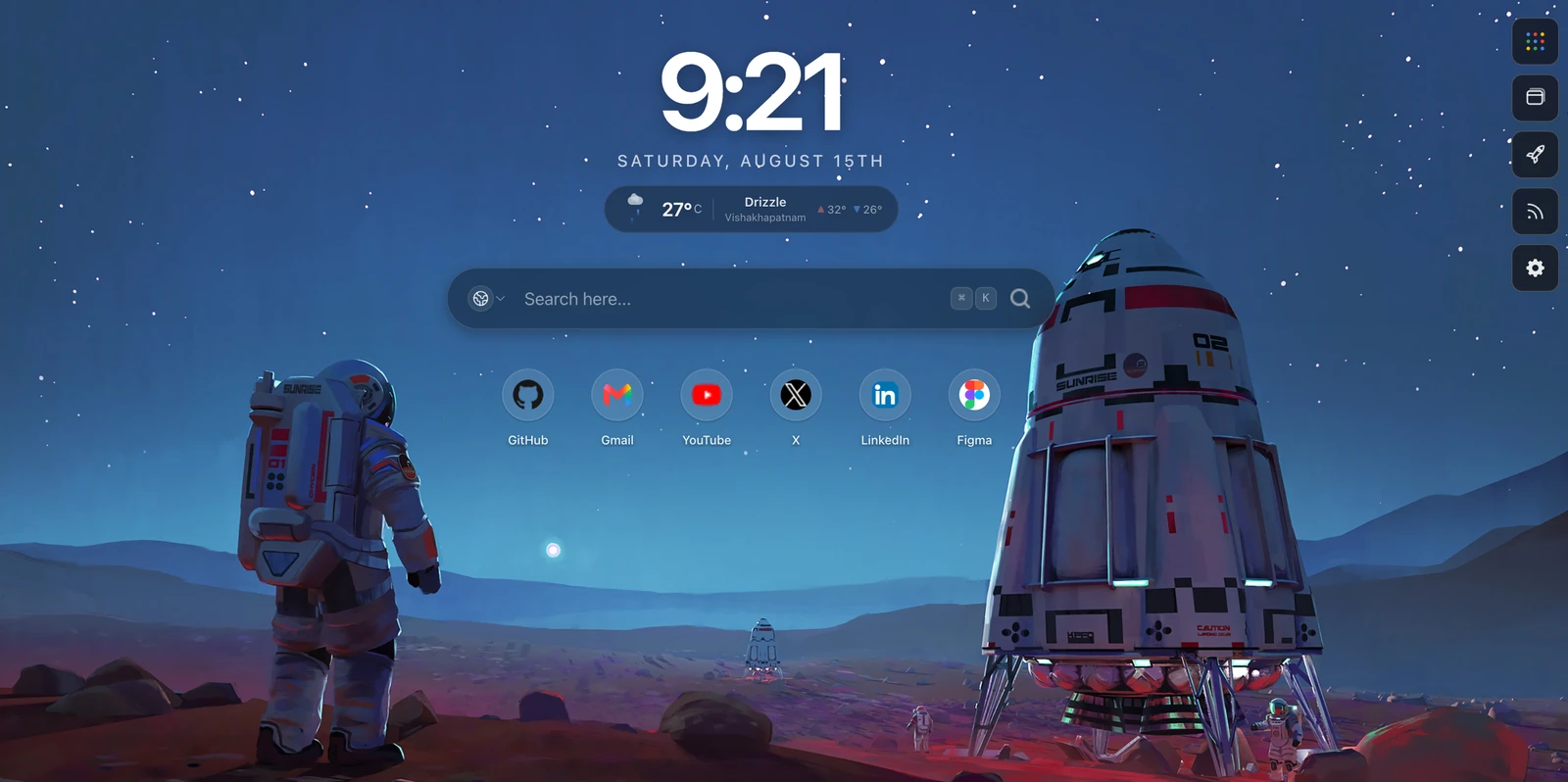
Sparkly replaces your browser's blank new tab with a stunning productivity dashboard. Manage tabs, read dev feeds, launch Google apps, search anything — all from one beautiful, customizable home base.

13+ Feed Sources
10 Google Apps
100% Free & Open
New Tab
Tabs 24
10:42
Tuesday, February 24th
HackerNews GitHub Dev.to Reddit
Tab Manager Duplicate Detection Session Save & Restore Unsplash Wallpapers Gmail Google Drive Google Calendar YouTube Smart Search HackerNews GitHub Trending Reddit Topic Filtering Custom RSS Themes Accent Colors Tab Manager Duplicate Detection Session Save & Restore Unsplash Wallpapers Gmail Google Drive Google Calendar YouTube Smart Search HackerNews GitHub Trending Reddit Topic Filtering Custom RSS Themes Accent Colors
Features

Everything you need,
right in your new tab.

Not just another pretty new tab. Sparkly is a full productivity suite packed into the page you open 50+ times a day.

Smart Tab Manager

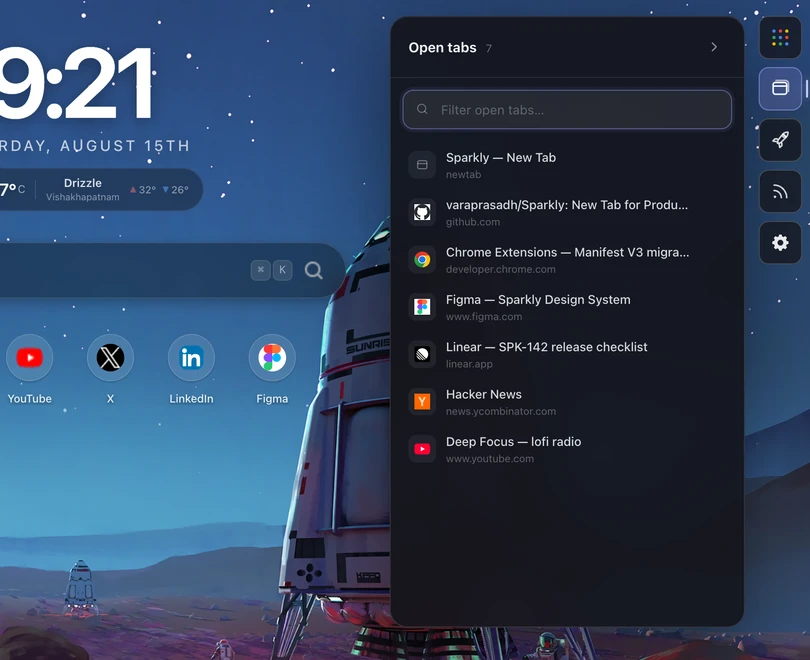
A full tab management sidebar built into every new tab. See all your tabs across every window, grouped by window or domain. Find any tab instantly with real-time search.

Live Tab List Group by Window/Domain Search

Duplicate Detection

Duplicate tabs are automatically highlighted. One click to close all duplicates at once — keeping only the first instance of each. No more 40-tab chaos.

Auto-Detect Bulk Close Highlighted

Session Save & Restore

Save your entire workspace — all windows and tabs — as a named session. Restore it later with one click. Plus recently closed tabs are always recoverable.

Save Workspace One-Click Restore Recently Closed

Beautiful Wallpapers

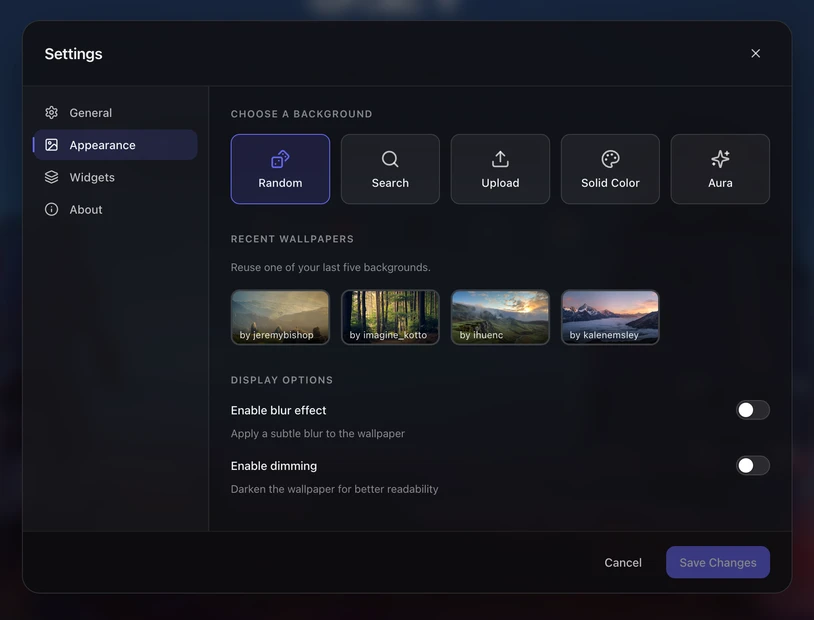
Stunning wallpapers from Unsplash with 4 modes: random auto-refresh, search by keyword with 8 category chips, pick from your history, or use a solid color. Add blur and dim for readability.

Unsplash Search & Browse History Blur & Dim

Google Apps, One Click Away

A sleek sidebar with 10 Google services: Gmail, Drive, Calendar, Docs, Sheets, Meet, Keep, YouTube, Photos, and Maps. Every app you use daily, always within reach.

Gmail Drive Calendar +7 more

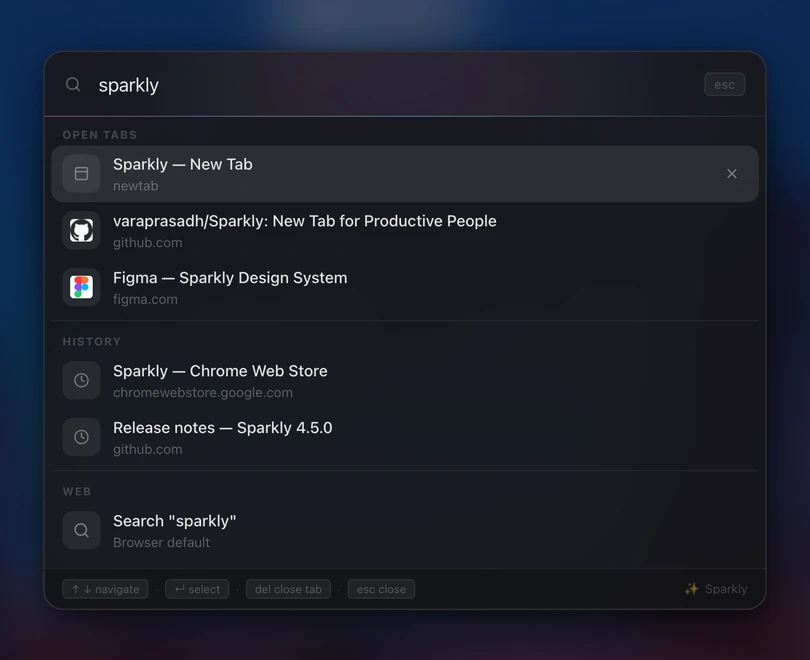
Smart Search

A glassmorphic search bar front and center. Live suggestions from Google, keyboard navigation with arrow keys, and your choice of 4 engines: Google, DuckDuckGo, Bing, or Yahoo.

4 Engines Live Suggestions Keyboard Nav

FeedHub — 13+ Sources

HackerNews, GitHub Trending, Dev.to, Reddit, Product Hunt, Lobsters, Hashnode, Medium, TechCrunch, The Verge, freeCodeCamp, HackerNoon. Plus add your own custom RSS feeds.

Multi-Column Topic Filter Custom RSS

Deep Customization

Light, dark, or auto theme. 9 accent colors. Adjustable font size, layout density, border radius, and animation toggles. Transparency and blur controls. Make it yours.

Themes 9 Accent Colors Density Radius

Quick Links & Top Sites

Your most visited sites appear automatically with favicons and notification badges. Configure 4 to 12 tiles. Sites with unread counts (like Gmail) show live badge numbers.

Auto-Detect Notification Badges Configurable
In-Depth

Built for developers
who live in their browser.

Tab Manager

Tame your tab chaos.

A full sidebar tab manager that updates in real-time. See every tab across all windows, group them by window or domain, search instantly, and close duplicates in one click.

  • Live tab count and real-time updates
  • Group by window (color-coded) or domain
  • Duplicate tabs auto-highlighted in pink — bulk close with one button
  • Suspend inactive tabs to free memory
  • Save entire workspace as a named session
  • Restore saved sessions or recently closed tabs
  • Click any tab to instantly switch to it
Sparkly Tab Manager 24
Windows Sites
Window 1 (8 tabs)
×
×
×
Window 2 (5 tabs)
×
×
2 duplicate tabs found Close All
Google Apps

Your Google workspace, one click away.

A permanent sidebar with 10 Google services. No more typing URLs or hunting through bookmarks. Gmail, Drive, Calendar, Meet — all right there on every new tab.

  • Gmail — jump straight to your inbox
  • Google Drive — access files instantly
  • Calendar — check your schedule
  • Docs, Sheets — open documents fast
  • Meet — start or join meetings
  • Keep, YouTube, Photos, Maps
  • Can be hidden via settings if you don't need it
Gmail
Drive
Calendar
Docs
Sheets
Meet
Keep
YouTube
Photos
Maps
Wallpapers

Start every session inspired.

Four wallpaper modes powered by Unsplash. Every new tab can greet you with a fresh landscape, a searched theme, or a solid color. Add blur and dim for perfect text readability.

  • Random — fresh nature/cosmos photo on every tab
  • Search — find any wallpaper with 8 quick category chips
  • History — pick from your last 5 wallpapers
  • Solid Color — 18 curated color options
  • Toggle blur and dim overlay for readability
  • Photographer attribution from Unsplash
🎲 Random
🔍 Search
📚 History
🎨 Color
Photo by John Doe — Unsplash
Try It Out

Your new tab,
your rules.

Toggle widgets on and off. Change settings. See how Sparkly adapts to your needs.

Widgets

Settings

🔍 Search tabs... 12 tabs
8:30
MONDAY, MARCH 1ST
☀️ 24° San Francisco
📡 Developer News
Photo by Unsplash
Productivity Impact

Stop context-switching.
Start flowing.

Every new tab is a chance to either lose focus or gain it. Sparkly makes sure it's the latter.

0
tabs/day

The average developer opens 50+ new tabs daily. Each one is a touchpoint with Sparkly — your feeds, your tabs, your apps.

0
min saved

No more switching between HN, GitHub, Gmail, and Drive. Everything lives in one place — your new tab.

0
cost

Completely free. No subscriptions, no premium tiers, no data harvesting.

Without Sparkly

  • Open new tab → blank page
  • Type gmail.com to check email
  • Type drive.google.com for files
  • Open HN in another tab
  • Can't find that tab from yesterday
  • 30 duplicate tabs piling up
  • Lose 10+ minutes of context daily
vs

With Sparkly

  • Open new tab → everything is here
  • Gmail one click away in the sidebar
  • Drive, Calendar, Meet — always there
  • 13 feeds in one widget, filter by topic
  • Search any tab instantly, switch in one click
  • Duplicates auto-detected and bulk-closed
  • Save & restore sessions across days
What Developers Say

Loved by developers
who value their time.

★★★★★
“The tab manager alone is worth installing. I had 40+ tabs and didn't realize half were duplicates. One click and they were gone. The session save is clutch when I need to restart Chrome.”
A
Alex R.
Full-Stack Developer
★★★★★
“Having Gmail, Drive, and Calendar one click away on every new tab is a game changer. I used to type those URLs dozens of times a day. Now they're just… there.”
S
Sarah K.
Product Manager
★★★★★
“The wallpapers from Unsplash are gorgeous. I search for ‘ocean’ or ‘space’ and get stunning backgrounds. The blur effect makes text readable without ruining the view.”
M
Marcus T.
UI/UX Designer
★★★★★
“I work with Python and AI. The topic filter lets me see only relevant content across HackerNews, Reddit, and Dev.to at once. Multi-column view shows them all side-by-side. Perfect.”
J
James L.
ML Engineer
★★★★★
“I save my work session at EOD and restore it the next morning. Every tab, every window, exactly where I left it. This should be built into Chrome honestly.”
P
Priya M.
DevOps Engineer
★★★★★
“The customization depth is wild — accent colors, border radius slider, layout density, animation toggles. I have a dark purple theme with rounded corners and it looks incredible.”
D
David C.
Frontend Engineer

Ready to supercharge
your new tab?

Tab manager. Dev feeds. Google apps. Beautiful wallpapers. All free and privacy-first.