Five sources, one beautiful result

A new backdrop, every new tab.

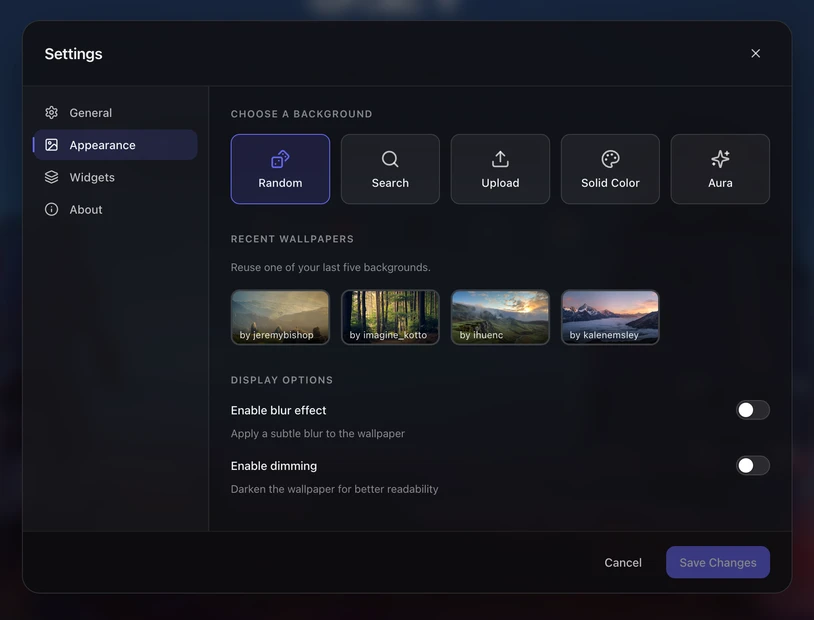
Pick from fresh random Unsplash photography, search for a mood, upload your own, browse previously seen wallpapers, or fall back to a solid color. Dial in readability with blur and dim overlays.

5 wallpaper sources Blur + dim controls Offline-first cache
Ocean
Desert
Space
Muted
Random
Search
Upload
History
Color
Source: Random

A fresh Unsplash photo, every tab.

Queries Unsplash's curated catalog with a Sparkly-tuned keyword mix (nature, sky, cosmos, illustrations) biased toward landscape shots. Each photo is cached locally — your wallpaper loads even when you're offline.

  • Offline cache — last wallpaper persists as a data URL.
  • Photographer credit — name + Unsplash link in the corner.
  • No repeat fatigue — 10-deep history prevents recent photos reappearing.
Photo by @mstrmarshall on Unsplash
Source: Search

Search Unsplash without leaving your tab.

Type "mountains" or "minimal" or "cyberpunk" — Sparkly queries Unsplash's search API and shows a grid. Pick one, it becomes your wallpaper. Eight curated chips cover the most-wanted moods out of the box.

  • Live results — 12 landscape photos per query.
  • Suggestion chips — nature, mountains, ocean, city, space, forest, sunset, abstract.
  • Attribution honored — Sparkly pings Unsplash's download endpoint for proper analytics.
mountains at golden hour
nature mountains ocean sunset
Overlays

Readability knobs, right there.

Busy wallpaper ruining text contrast? Toggle Blur to soften it without losing the atmosphere. Toggle Dim to drop brightness for evening use. Both are saved alongside the source, so your darkening preference sticks.

  • Blur — subtle 6px blur with a 1.05× scale to hide edges.
  • Dim — 10% black overlay for evening readability.
  • Combinable — use either, both, or neither.
Clean text — OK
Raw wallpaper
Blur + Dim

Sources at a glance

5Wallpaper sources
18Preset solid colors
25 MBMax upload size
10History depth

Questions

Are my uploaded wallpapers sent anywhere?

No — uploads are stored as base64 in Chrome's local extension storage and never leave your browser. Max size is 25 MB to stay within storage quotas.

Does random mode fetch on every new tab?

Once per session by default, then served from cache. You can manually refresh in settings.

Is Unsplash used commercially? Do I need to credit photographers?

Sparkly is free and non-commercial. Photographer credits appear in the corner of your new tab and are linked to Unsplash profiles — no action needed from you.

Related features

A new vibe, every tab.

Add Sparkly to Chrome